
EVERYDAY TOOLS
Make something. Move forward.
SIX WAYS TO START
Explore Easywan features.
Every tool here is in the Easywan app for phones and tablets. Search by name or by what you want to do.
33 features
- Available Now
CV
Put your experience, education, skills and photo into a clear CV. Choose a ready-made design and make it yours.
Documents & Business
- Available Now
Invoice
Bill customers with your business details and an items table that adds up the totals. Choose a ready-made design and make it yours.
Documents & Business
- Available Now
Receipt
Record a payment with a receipt that carries your business details. Choose a ready-made design and make it yours.
Documents & Business
- Available Now
Letter & Letterhead
Write formal and everyday letters on your own letterhead, with your signature. Choose a ready-made design and make it yours.
Documents & Business
- Available Now
Business Card
Editable front-and-back business cards with your name, role and contact details. Choose a ready-made design and make it yours.
Documents & Business
- Available Now
Certificate
Recognise completion, achievement or participation. Easywan certificates do not certify accreditation. Choose a ready-made design and make it yours.
Documents & Business
- Available Now
ID Card
Staff, student, member and event cards. Not government identity documents. Choose a ready-made design and make it yours.
Documents & Business
- Available Now
Invitation
Event and celebration invitations with your details and photos. Choose a ready-made design and make it yours.
Documents & Business
- Available Now
My Brand Kit
Save your logo, brand colours, and business and personal details once. Your brand colours come first in every colour picker.
Documents & Business
- Available Now
Customers
Keep your customers’ names and contact details in one place.
Documents & Business
- Available Now
Products & Services
Save the products and services you sell, with prices, so they are always at hand.
Documents & Business
- Available Now
Signatures & Stamp
Draw, type or upload your signature and company stamp once, then add them to any design. A picture of a signature, not a certified electronic signature.
Documents & Business
- Available Now
Creative Packs
Guided steps that chain Easywan's tools for one goal. Each step opens the real tool.
What’s inside (5)
- Job Pack
- Seller Pack
- Event Pack
- Study Pack
- Memories Pack
Documents & Business
- Available Now
Universal Design Editor
One editor for every design: text, photos, shapes and elements on one or more pages. Everything stays editable. Export as PDF, PNG or JPG.
What’s inside (12)
- Text: font, size, colour, format, spacing and effects such as shadow, glow, curve and 3D depth
- Photos: replace, crop, trim, looks, adjust, Remove BG and remove objects
- Elements: shapes and lines, frames and smart mockups, icons, social media logos, stickers, text and design blocks, backgrounds, effects, and data and layouts
- Gradients and fades that blend a photo into the background
- Charts, tables, calendars, tickets, QR codes and barcodes you fill with your own data
- Colours: your Brand Kit colours first, Hex codes and an eyedropper
- Layers, position and align, group, lock and hide
- Opacity, shadow, outline strokes, flip and rotate
- Duplicate, copy and paste style
- Pages, Resize and a custom size
- Signatures and stamps as their own layers
- Undo, Redo, History, Versions, Save as new and Check design
Creative Designs
- Available Now
Creative Templates
3,100+ editable designs, from weddings and birthdays to business flyers, menus, certificates and social media. Each one opens in the Universal Design Editor.
What’s inside (8)
- Documents
- Celebrations
- Business & Marketing
- Social & Media
- Community & Planning
- Education & Professional
- Lifestyle & Services
- Browse Designs, Search and Share design
Creative Designs
- Available Now
Image Studio
A full photo editor. Start with one tap of Auto, choose a look, or go deeper with makeup, skin, face and paint tools.
What’s inside (9)
- Enhance: Auto and Photo Rescue
- Manual Edit: Filters, Adjust, Crop, Remove background, Smooth skin, Spot brush, Reshape, Curves, Blur, Effects, Light leaks, Remove objects, Heal & clone
- Makeup: Looks, Lipstick, Blush, Eyeshadow, Eyeliner, Brows, Contour, Foundation
- Skin: Auto, Smooth & tone, Spa Mask, Tan, Freckles
- Spot Remover: Auto, Tap to Heal and Brush Heal
- Teeth & Smile, Eyes, Face, Body and Shape & Size
- Paint: Lipstick, Eye Color, Skin Tone, Lighten, Darken, Color, Details, Glitter, Pixelate
- Tools: Photo Doctor, Masks, Batch and All tools
- Beauty, Earrings, Glasses, Fun, Beards and Background
Photos & Images
- Available Now
Film Lab
Give photos a film or vintage feel with grain, light leaks, motion, date stamps and frames.
What’s inside (5)
- Classic Film and Vintage & Retro looks
- Film effects: grain, glow and light leaks
- Motion
- Date stamp
- Frames
Photos & Images
- Available Now
Remove Objects
Mark what you don’t want with Brush or Tap to select, and Easywan rebuilds the area from the rest of the photo, on your phone.
Photos & Images
- Available Now
Background Studio
Remove the background of a photo and choose what goes behind: transparent, a colour, a gradient, your own photo, a blur or a ready-made backdrop.
Photos & Images
- Available Now
Photo Grid
Combine 1 to 9 photos in editable collage layouts, then save as JPG, PNG or PDF.
Photos & Images
- Available Now
Photo Booth
Photo strips, duos and grids with a countdown, captions, frame colours and looks.
Photos & Images
- Available Now
Batch Photo Editor
Edit up to 50 photos at once with the same look, light, size, format and watermark.
Photos & Images
- Available Now
Easywan Camera
Take photos in Normal or Film mode with looks, a self-timer, grid and flash.
Photos & Images
- Available Now
Professional Photo Tools
Prepare profile and product photos, check image quality and get the right size for sharing.
What’s inside (5)
- Career & Profile Photo
- Product Photo
- Image Quality Inspector
- Quick Share Sizes
- Photo to Design
Photos & Images
- Available Now
Asset Library
Keep cut-outs, cleaned logos, products and favourite edits on your phone, ready to reuse.
Photos & Images
- Available Now
Create QR
Create more than 50 kinds of QR code, styled with two colours, a pattern, a frame and your logo. Test a code before you print it.
What’s inside (7)
- Links & Digital Content: Website URL, App Download, PDF Link and more
- Contact & Messaging: Contact Card, Digital Business Card, WhatsApp Chat, Phone Call, SMS, Email
- Social Media: Instagram, TikTok, Facebook, YouTube, LinkedIn, X and more
- Places & Events: Map Location, Directions, Event Information, Add to Calendar
- Business & Services: Restaurant Menu, Price List, Booking, Payment Link and more
- Quick Utilities & Data: Wi-Fi Access, Plain Text and more
- Style: two colours, pattern, corners, frame, logo, margin and error correction
QR & Quick Tools
- Available Now
Scan QR
Scan a QR code with your camera and see what it contains before you open it.
QR & Quick Tools
- Available Now
Saved QR codes
Keep the QR codes you create so you can open, change and share them again.
QR & Quick Tools
- Available Now
Easywan AI
Ask for what you need and Easywan AI shows matching designs to open, helps you write and improve text, and explains any tool. It stays off until you agree to it, and you review every change.
Easywan AI
- Available Now
My Designs
Your designs save automatically on your phone. Reopen them, keep editing, or save a copy as new.
What’s inside (4)
- Automatic saving
- Versions and History
- Save as new
- Folders, Favorites and Recently Deleted
Projects, Saving & Exporting
- Available Now
Documents
Your workspace: everything you’ve made, in one tab, with Search, Drafts, Folders, Favorites and Exports.
Projects, Saving & Exporting
- Available Now
Photo Projects
Return to photo edits and layouts you've saved on your phone.
Projects, Saving & Exporting
- Available Now
Export & Share
Save your work as PDF, PNG or JPG, to your Photos, or share it straight to other apps.
What’s inside (4)
- Designs and documents: PDF, PNG, JPG
- Photos: JPG, PNG (transparent PNG for cut-outs) and PDF
- Sizes: Standard, High, Print and Custom
- Save to Photos, Save to Files, Share or Print
Projects, Saving & Exporting
START WITH WHAT YOU NEED
Everyday work.
A familiar place.
From the first draft to the file you share, keep useful tools close at hand.
Read the Easywan guides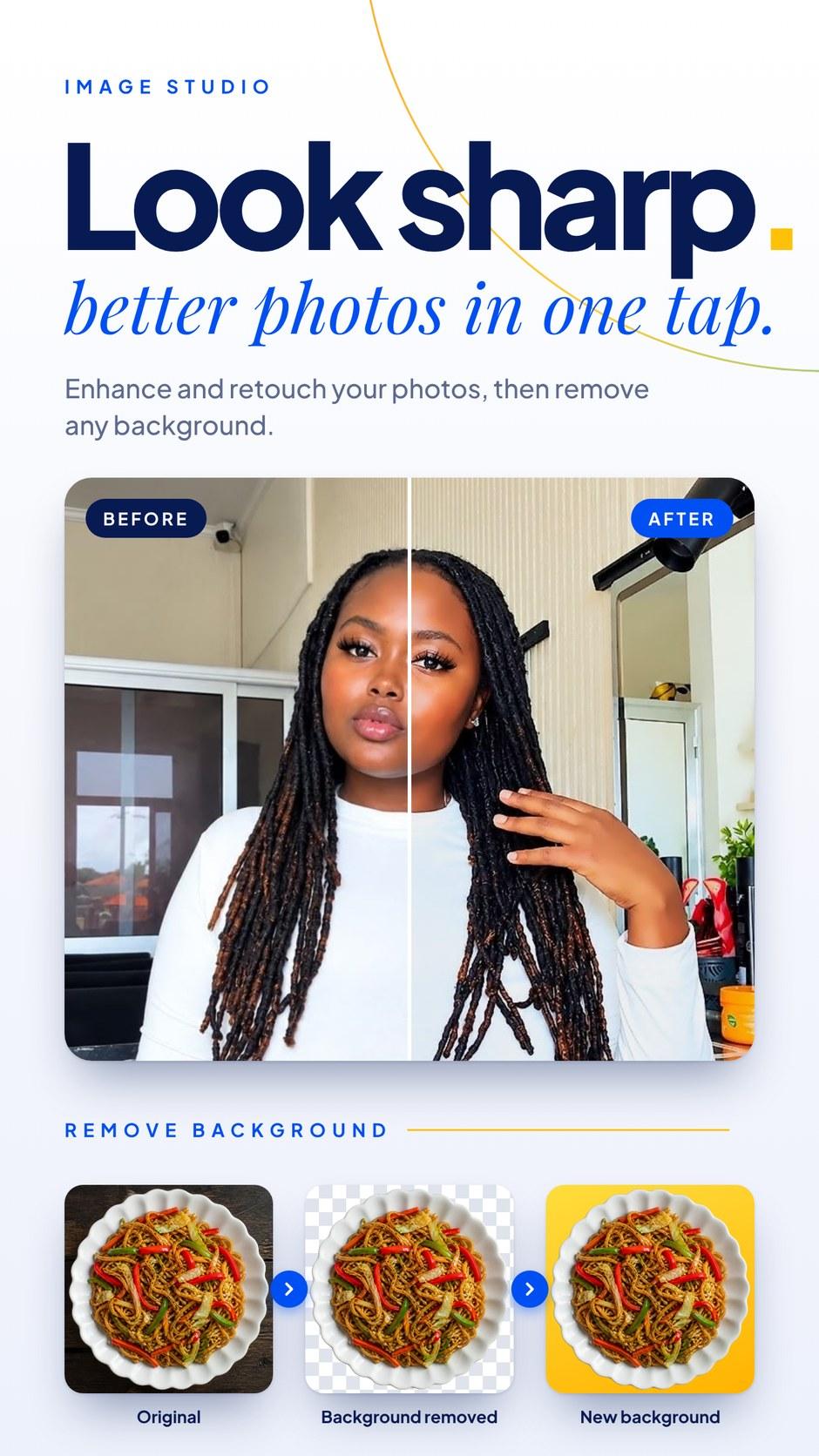
01 / DOCUMENTS & BUSINESS
Make it yours.
CV · Invoice · Receipt · Letter & Letterhead · Business Card · Certificate · ID Card · Invitation
Eight kinds of document for work, study, business and special occasions. Choose a ready-made design, tap any text to add your details, and export a PDF or image. Invoice and receipt designs with an items table add up the totals for you.
02 / DESIGN & TEMPLATES
One editor for every design.
3,100+ templates · Universal Design Editor · Certificates · Flyers · Promotions · Events
Start from 3,100+ editable templates or from blank. Every design opens in the same editor: text and fonts, photos and frames, shapes, icons, stickers and effects from Elements, layers, pages and export. Share a design link so a friend can start from the same one.
03 / PHOTOS & IMAGES
Make every photo look its best.
Image Studio · Film Lab · Background Studio · Remove Objects · Camera · Batch Photo Editor · Professional Photo Tools · Asset Library
Fix a photo with one tap of Auto, choose a look, or go deeper in Image Studio with makeup, skin, face and paint tools. Add film effects, replace or blur backgrounds and remove unwanted objects. Everything happens on your phone; your photos are not uploaded.
04 / PHOTO GRID & COLLAGES
Your moments, together.
Photo Grid · Photo Booth
Combine 1 to 9 photos in editable layouts, or make photo-booth strips, duos and grids with a countdown. Save as JPG, PNG or PDF.
05 / QR CODES
One scan. A new connection.
Create QR · Scan QR · Saved QR codes
Make more than 50 kinds of QR code, from websites and Wi-Fi to WhatsApp, menus, events and social profiles, with your own two colours, a frame and your logo. Scan a code to check it before you print.
06 / EASYWAN AI
A little help goes a long way.
Find a design · Writing help · Tool guidance · Voice input
Tell Easywan AI what you need and it shows designs you can open, explains any tool step by step and helps you write. Writing help works online after you agree to it. It does not create pictures or logos, and you should check its answers.
07 / BUSINESS & PRODUCTIVITY
Set up once. Use again.
My Brand Kit · Customers · Products & Services · Signatures & Stamp · Creative Packs
Save your logo, brand colours and business details once in My Brand Kit, and keep your customers, products, signatures and stamp close at hand. Creative Packs guide you step by step through goals such as a job application or selling online.
08 / PROJECTS, SAVING & EXPORTING
All your work, ready when you are.
Documents tab · My Designs · Photo Projects · Backup & Sync · Export & Share
Your work saves automatically on your phone, with versions and history, and it is all in the Documents tab. Your business details and saved QR codes are also backed up to your account when you are signed in. Export as PDF, PNG or JPG, save to Photos or Files, or share to other apps.
A little less busywork.
Make room for
what’s next.
Easywan brings the everyday tools you need into one simple place.
- Flyers
- CVs
- Invoices
- Photos
- QR codes
Download from Google Play.



